Fennel
Follow these steps to connect your Fennel brokerage account to Level2 and enable fully automated trading.
1. Open a Fennel Account
Sign up to open a Fennel Trading account.
- Registration: Sign up and complete the account registration process.
- Subscription: Subscribe to a plan that suits your trading needs.
2. Create your Level2 account
Fennel users receive free access to Level2 with deployment limits depending on your Fennel subscription plan:
- Basic Plan: 1 live deployment, 3 virtual deployments.
- Premium Plan: 3 live deployments, 3 virtual deployments.
Steps:
- Register for a Level2 account using the link shared.
- Your coupon code will be automatically applied, activating free access
- Log in to Level2 to connect.
Need support? Contact the level2 team - contact@trylevel2.com
3. Connect the API service
To enable automated trading, connect Level2 to your Fennel account:
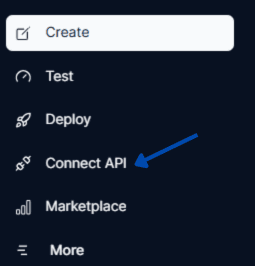
- Step one: Go to the Connect API section in Level2
- Step two: Enter your Fennel Personal Access Token (You can find this in your Fennel account settings under API access or contact the Fennel team)
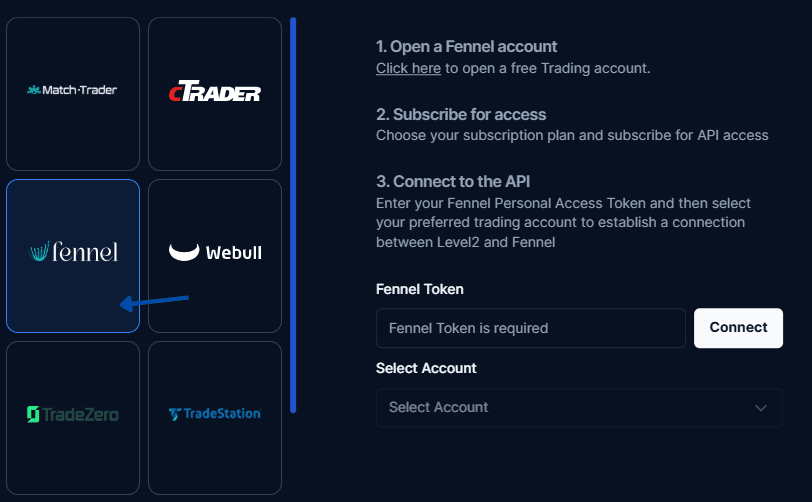
- Step three: Click Connect and select your trading account from the dropdown
Questions? If you have any questions or need technical support, contact the Fennel team directly - support@fennel-financials.com
Last updated on