Deploy Strategy
The Deploy Page allows you to review your strategy configuration and deploy it to your connected broker. Before going live, you can verify strategy details, adjust quantities, and review historical backtest performance.
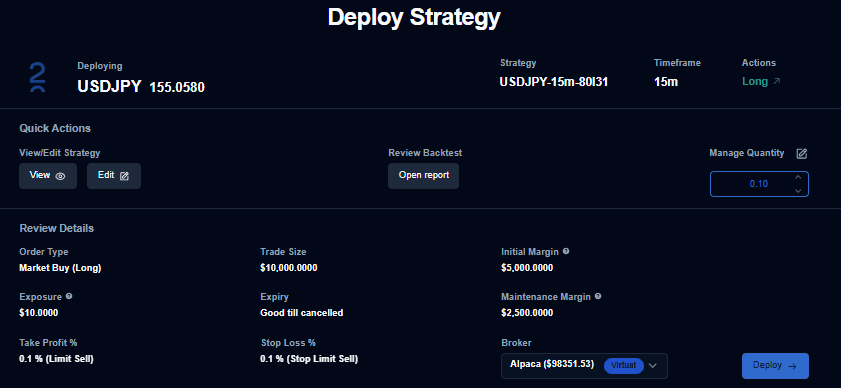
Strategy Information
At the top of the page, you will find the essential metadata for your deployment:
- Symbol: Displays the trading instrument the strategy will run on.
- Strategy Name: Shows the specific name of your selected strategy.
- Timeframe: Indicates the chart interval used by the strategy to execute trades.
Quick Actions
The Quick Actions section provides shortcuts to verify or modify your setup before the final deployment.
- View Strategy: Opens the configuration in read-only mode to review logic and parameters.
- Edit Strategy: Allows you to modify settings if changes are required before going live.
- Review Backtest: Opens the full backtest report to analyze historical performance.
- Manage Quantity: Lets you adjust the number of units or contracts traded upon execution.
Review Details
Carefully review each field in this section to ensure the configuration matches your intended trade setup.
| Parameter | Description |
|---|---|
| Order Type | The execution method for the market (e.g., Market or Limit). |
| Trade Size | The total value or position size used for the trade. |
| Initial Margin | The minimum capital required to open the position. |
| Exposure | Total market exposure relative to your allocated capital. |
| Order Expiry | How long the order remains active (e.g., Good Till Cancelled). |
| Maintenance Margin | The minimum balance required to keep the position open. |
| Take Profit | The level or percentage at which the system secures profits. |
| Stop Loss | The level or percentage at which the system limits potential losses. |
| Broker Name | The specific broker account used for deployment. |
Deployment
Once you have reviewed all details, click the Deploy button to activate your strategy.
Note on Errors: If the system detects any configuration issues after you click Deploy, an error message will appear with specific suggestions for resolving the conflict and proceeding.