Connecting Your Kalshi Account via API
Follow this step-by-step guide to securely generate your Kalshi API credentials and link your account to the Level2 platform for fully automated trading.
Step 1: Create a Kalshi Account
Open Kalshi account and log in with your credentials. If you already have an account, simply sign in to proceed.
Step 2: Generate Your API Credentials
- After logging in, navigate to the Account & Security settings.
- Scroll down to the API section.
- Click on the Create API Keys button.
Kalshi will generate the following credentials:
- API Key ID: A unique identifier used for authentication.
- Private Key: Used to securely authorize API access.
Store your Private Key securely (e.g., in a password manager). It will only be displayed once at the time of creation and cannot be recovered or viewed later. If lost, you will need to delete the key and generate a new pair.
Step 3: Connect Kalshi to Level2
- Log in to your Level2 platform dashboard.
- Navigate to the Connect API section from the sidebar or settings menu.

- Select Kalshi from the list of supported platforms and brokers.
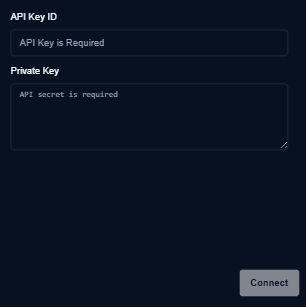
- Enter your generated credentials in the corresponding fields:
- API Key ID
- Private Key
- Click Connect.
Once your credentials are successfully validated, your Kalshi account status will update to Connected, and you will be ready to deploy fully automated trading strategies through Level2.
Last updated on