Backtest Setup: Capital Configuration
The Configure Backtest Capital modal is a setup dialog that appears after designing a trading strategy on the strategy canvas. It allows users to define key backtest parameters—specifically the starting account balance and capital deployment rules—to normalize historical performance metrics and control risk before running a backtest.
Strategy Setup & Navigation Flow
To access the backtest configuration modal and execute your strategy:
- Select Parameters: Choose your target Broker, Asset Name, and Timeframe.
- Access the Canvas: You will be redirected to the canvas page to visually build, connect, and configure your strategy logic.
- Trigger Backtest: Once your strategy design is complete and ready for evaluation, click the Backtest button located in the top corner of the canvas.
- Modal Pop-up: The Configure Backtest Capital modal will display, prompting you to finalize your financial parameters before launching the historical simulation.
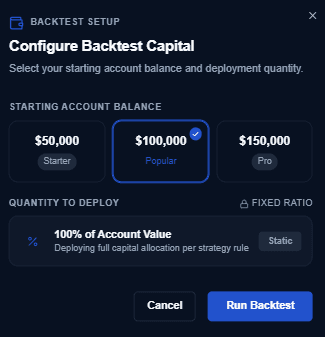
Configuration Settings Breakdown
1. Starting Account Balance
Sets the virtual cash amount available at the start of the historical backtest period:
- $50,000 (Starter): Simulates performance on a smaller account size, ideal for testing strategy viability with minimal margin leeway.
- $100,000 (Popular): Selected by default as the standard benchmark starting capital.
- $150,000 (Pro): Simulates a larger capital base, suited for high-volume strategies or managing larger position sizes.
2. Quantity to Deploy
Determines position sizing and how capital is allocated across trade signals:
- 100% of Account Value: Deploying full capital allocation per strategy rule. The backtest engine dynamic scales position sizing based on current account equity (compounding profits during winning streaks and scaling back during drawdowns).
- Allocation Model: Fixed Ratio (Static).
Modal Control Actions
- Cancel: Closes the setup modal without running the simulation or saving changes.
- Run Backtest: Saves the selected capital configuration and executes the backtesting engine across historical data.
Performance Considerations
- Standardized Metrics: Using a fixed baseline capital ensures accurate calculation of ROI, CAGR (Compound Annual Growth Rate), and **Max Drawdown **.
- Compounding Effects: Deploying 100% account value accurately reflects realistic compounding gains and account equity curves over time.
Verifying Capital
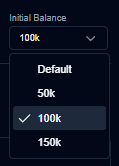
To cross-check the configured capital, you can refer to the generated backtest report.
Last updated on