MetaTrader 5 (MT5) Integration Guide
Follow these steps to connect your MT5 account to Level2 and enable automated trading.
Install MT5
- Download MetaTrader 5 from your broker’s website or the official MetaTrader site
- Install it on your device (Windows, Mac, Android, or iOS)
Subscribe to Level2
To use MT5 with Level2, you’ll need an active Level2 Pro subscription.
- Visit the subscription page to learn more and get started.
Connect Your MT5 Account
To enable automated trading, link your MT5 account with Level2:
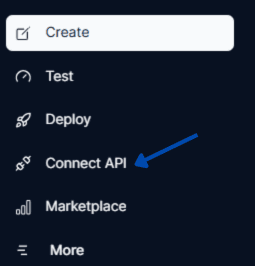
- Log in to Level2 and go to the Connect API section
- Select the MetaTrader 5 option

- Enter your Login ID, Master Password, and Server details
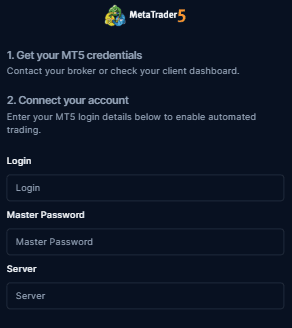
- Click Connect to complete the setup
Need support? Contact the level2 team - contact@trylevel2.com
Troubleshooting
| Issue | Solution |
|---|---|
| Invalid account | Double-check your login credentials |
| No connection | Verify your server details and internet connection |
| Server name | If you’re unsure about your server name, contact your broker’s support team |
Last updated on