Strategy Add-Ons
Strategy add-ons are optional controls you can apply to a strategy to manage when it runs, how long it runs, and how much risk it takes. These act as a safety and operational layer over your core trading logic.
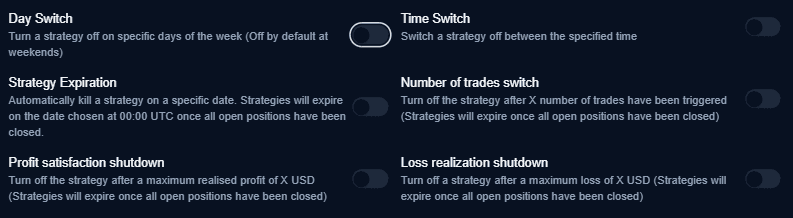
1. Controls (Scheduling)
These add-ons manage the timing of your strategy to align with specific market sessions or avoid volatile periods like weekends.
1.1 Day Switch
Controls which days of the week your strategy is allowed to be active.
- Function: Toggle the strategy ON or OFF for specific days.
- Default: Weekends are turned off by default to avoid illiquid gaps.
1.2 Time Switch
Defines the intraday activity window. The strategy remains inactive outside of these hours.
- Start Time (UTC): The exact time the strategy becomes active.
- End Time (UTC): The time at which the strategy stops scanning for new signals.
1.3 Strategy Expiration
Automatically terminates the strategy on a specific calendar date.
- Timing: Expiration occurs at 00:00 UTC on the selected date.
- Safety: Any open positions will be closed before the strategy fully stops.
2. Number of Trades Switch
Prevents over-trading by capping the total activity of the strategy session.
- Logic: Set a maximum number of executed trades.
- Shutdown: Once the limit is reached, the strategy is disabled.
- Note: The strategy expires only after all open positions are closed to ensure no orphaned trades remain.
3. Financial Circuit Breakers (Shutdowns)
These add-ons protect your capital by monitoring realized P&L and disabling the strategy once specific financial thresholds are hit.
| Add-On | Description | Action |
|---|---|---|
| Profit Satisfaction | Automatically turns off the strategy once a set profit target (in USD) is reached. | Closes open positions and stops the strategy. |
| Loss Realization | Automatically stops the strategy after a defined maximum allowed realized loss (in USD). | Closes open positions and prevents further execution. |
Key Operational Rules
- Position Priority: For all shutdown add-ons, the system will prioritize closing any active market exposure before the strategy status is set to “Off.”
- UTC Standardization: All time-based settings operate on Coordinated Universal Time (UTC) to ensure cross-exchange consistency.
- Non-Persistent: Shutdowns usually reset upon manual reactivation of the strategy unless parameters are modified.
Pro Tip
Combine the Time Switch with the Number of Trades Switch to create a “Scalping Window”—allowing the strategy to hunt for a maximum of 5 high-probability setups during the first hour of the market open.